
Best AI Lip Sync Video Tools in 2026 — Tested & Ranked
We spent two weeks testing the top 6 AI lip sync platforms with the same audio clips across 3 languages. Here's how they stack up on lip sync accuracy, output quality, ease of use, and real value — so you can pick the right tool in 5 minutes.
Individual Tool Reviews — What We Liked & What We Didn't
Each tool tested with identical audio clips. Strengths and weaknesses based on our hands-on results.
| Feature | 1. HeyGen | 2. Sync.so | 3. Hedra | 4. Kling AI | 5. Vozo AI | 6. DreamFace |
|---|---|---|---|---|---|---|
| Lip Sync Accuracy | Excellent | Excellent | Good | Very Good | Very Good | Fair |
| Languages Supported | 175+ | 30+ | 10+ | 130+ | 110+ | 20+ |
| Video Translation | ||||||
| API Access | ||||||
| Works with Real Footage | ||||||
| Custom Avatars | ||||||
| Built-in Avatar Library | ||||||
| Max Resolution | 1080p | 1080p | 1080p | 1080p | 1080p | 720p |
| Mobile App | ||||||
| Free Tier Available | Trial only | |||||
| Watermark on Free Tier | N/A | |||||
| Entry Paid Plan (Monthly) | $24 | $30 | $9.99 | Credits (~$0.35/5s) | Contact sales | $9.99 |
| Best For | Enterprise & Localization | Developers & Realism | Budget Creators | Cinematic Content | Translation & Dubbing | Social Media |
Individual Tool Reviews — What We Liked & What We Didn't
Each tool tested with identical audio clips. Strengths and weaknesses based on our hands-on results.
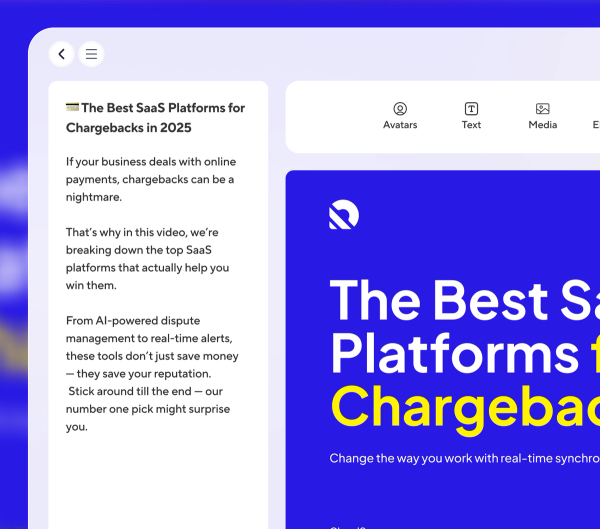
1. HeyGen
Best Overall — Score: 89/100
HeyGen is the most complete AI lip sync platform we tested. Its Avatar IV engine delivers near-perfect lip sync with 0.02-second precision — we saw zero visible misalignment in our English and Spanish test clips. The 175+ language support is unmatched, and the video translation feature actually re-syncs lip movements to the target language rather than just overlaying dubbed audio. What we liked: Studio-quality avatar library (300+ ready-to-use avatars), one-click video translation that preserves the speaker's tone, API access for building custom workflows, and Digital Twin creation for personalized avatars. Limitations: The credit system is confusing — different features pull from separate credit pools, and we burned through the Creator plan's 200 monthly credits faster than expected (roughly 10 minutes of Avatar IV video). The free tier adds a prominent watermark. At $24/month for Creator and $79/month for Pro, it's the most expensive option — but also the most capable.

2. Sync.so
Best for Realism & Developers — Score: 84/100
Sync.so (formerly Sync Labs) produces the most natural, subtle lip movements of any tool we tested. While HeyGen's avatars sometimes look slightly 'animated,' Sync.so's output on real human footage was nearly indistinguishable from genuine speech — especially on our monologue test clip, where micro-expressions around the mouth stayed intact. What we liked: Exceptional realism on real footage (not just avatars), strong open-source ecosystem with Wav2Lip expertise, developer-friendly API with good documentation, and a generous free tier for testing. Their Premiere Pro plugin is a standout feature for video editors. Limitations: API-first approach means no polished web UI for non-developers — you'll need some technical comfort to get started. The $30/month Pro plan is pricier than comparable tools without translation features. No built-in avatar library — you must supply your own footage. Language support tops out around 30 languages, far behind HeyGen.
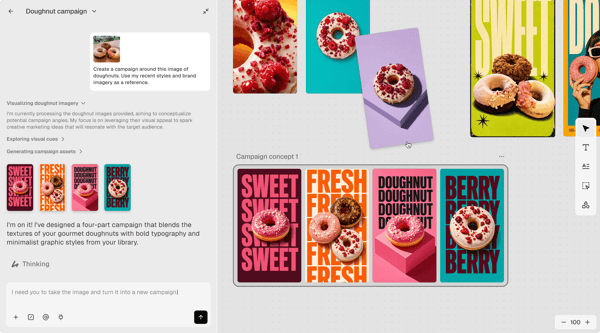
3. Hedra
Best Free Option — Score: 76/100
Hedra surprised us. For a free tool, the lip sync quality on character-based videos is genuinely good — our test clips showed clean mouth tracking with only minor artifacts on fast speech segments. It's the only tool in our test where you can produce decent lip sync videos without entering a credit card. What we liked: Truly free tier with meaningful usage limits (not just a teaser), solid character creation tools with good customization options, intuitive interface that got us from signup to first export in under 3 minutes, and character consistency across multiple generations. The community is active and the tool is improving quickly. Limitations: Character-only — doesn't work with real human footage at all. Resolution maxes out at 1080p with visible compression artifacts. Complex audio (singing, fast speech, multiple speakers) causes noticeable lip sync drift. No API access, no translation features, and commercial usage rights require the paid plan. If you're making faceless YouTube content or character-driven social videos, Hedra is excellent. For anything requiring photorealism, look elsewhere.
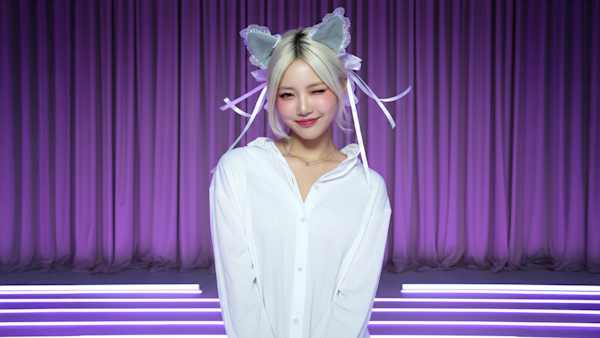
4. Kling AI
Best Cinematic Quality — Score: 82/100
Kling AI's lip sync sits inside a broader video generation platform, and the output quality reflects that pedigree. Our test clips rendered at crisp 1080p with 30-48 FPS — visibly sharper than Hedra and on par with HeyGen's best output. The cinematic color grading and smooth motion make it ideal for high-end promo content. What we liked: Best-in-class video quality with cinematic rendering, 130+ language support, credit-based pricing (~$0.35 per 5-second clip) that scales affordably for short-form content, and excellent character consistency across multiple shots. The integration with Kling's full video generation suite is a bonus. Limitations: Credit-based pricing becomes expensive for long-form content — a 2-minute video costs roughly $8.40. No dedicated lip sync web app — you're working within the broader Kling platform, which has a steeper learning curve. Processing times were the slowest in our test (2-4 minutes for a 30-second clip). No free tier beyond trial credits.
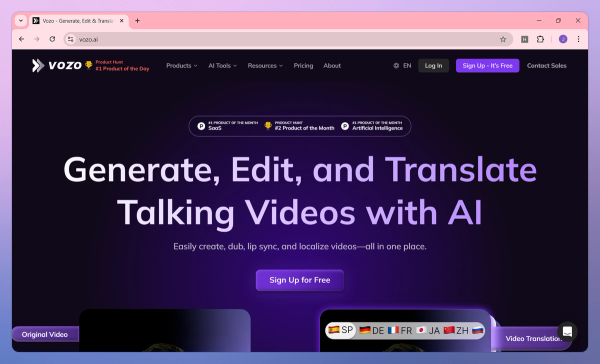
5. Vozo AI
Best for Translation & Dubbing — Score: 80/100
Vozo AI is the specialist's choice for video translation with lip sync. Its LipREAL™ engine re-syncs lip movements to translated audio — not just overlaying a new voice track — and the results on our Spanish and Mandarin test clips were impressive. Multi-speaker detection (up to 6 speakers) worked accurately, assigning distinct voice profiles to each person. What we liked: Best-in-class video translation workflow — upload, pick language, get lip-synced output. VoiceREAL™ voice cloning preserves the original speaker's tone across languages. Supports 61+ languages for lip sync and 110+ for translation. Handles projects up to 60 minutes — the best option for long-form content localization. Clean web interface with batch processing. Limitations: Lip sync quality on the original (non-translated) audio is good but not best-in-class. Free tier limits you to 1 face for lip sync. No API access and limited integrations. The pricing page is opaque — you need to contact sales for enterprise plans. For pure lip sync (no translation), HeyGen and Sync.so outperform it.
6. DreamFace
Best for Social Media & Mobile — Score: 68/100
DreamFace takes a fundamentally different approach — it's a mobile-first app (iOS and Android) designed for quick, fun lip sync content rather than professional production. The one-tap lip sync effects are genuinely delightful, and the music integration (sync your photo to trending songs) is unique among the tools we tested. What we liked: The easiest tool to get started with — download, snap a photo, pick a song or audio clip, and share within 60 seconds. Music library integration with trending tracks. Creative effects and filters designed for social media engagement. Free tier with daily generations. Limitations: The trade-off for simplicity is quality — lip sync accuracy is noticeably behind all other tools we tested, with visible mouth blur and misalignment on complex audio. Output resolution caps at 720p. No API, no custom avatars, no translation, no desktop/web interface. Commercial usage requires the $9.99/month Pro plan. This is purely a social media content tool — don't expect professional results. For TikTok, Instagram Reels, and casual creative projects, it's a fun option. For anything business-related, pick a tool above.
Deep Dive: How the 6 Tools Stack Up Head-to-Head
After two weeks of testing, here is who should pick which tool — based on your actual workflow, not marketing hype.
Generate your product model image with an AI image tool, then use HeyGen to create lip-synced product demo videos. The 175-language translation means one avatar can sell to customers in every market. Testing the waters? Try Hedra's free tier first.
Free, fast, and built for character-driven short-form content. Upgrade to HeyGen when your account is monetized and you need higher production value. Keep DreamFace on your phone for quick, casual posts.
Both re-sync lip movements to each target language, not just dub the audio. HeyGen wins on language count (175+); Vozo wins on multi-speaker handling (up to 6 speakers). Single presenter → HeyGen. Multi-person → Vozo.
The API is well-documented, lip sync quality on real footage is the best we measured, and the Premiere Pro plugin integrates into existing workflows. Pair with an AI image generation API for a fully automated image→video pipeline.
Kling AI for cinematic quality; Sync.so for the most natural lip sync on real actors. Both require more technical investment but reward you with output that stands up to professional scrutiny.
Hedra (free tier) for character content. DreamFace (free tier) for casual social posts. Both genuinely useful at zero cost. Ready to invest $10-30/month? HeyGen or Sync.so unlock professional quality.
The AI lip sync market in 2026 is maturing rapidly. Diffusion-based models (used by Kling AI and Sync.so) are replacing older GAN-based approaches (still used by Wav2Lip and early Hedra versions), delivering higher resolution and fewer artifacts. The biggest differentiator we observed wasn't technology — it was product philosophy. Tools like HeyGen and Vozo are built for specific workflows (enterprise video creation and dubbing, respectively), while tools like Sync.so and Kling AI provide raw capability that rewards technical users. Our advice: match the tool to your workflow, not the marketing.
One trend worth watching: native audio-video co-generation (where lip sync isn't a post-processing step but built into the generation itself) is emerging from ByteDance's Seedance and similar research models. This could fundamentally change the landscape within 12-18 months.
Pricing Breakdown — What You Actually Get at Each Tier
Free
Paid
Free tiers are genuinely useful for testing tools and producing occasional content — Hedra's free tier in particular impressed us. But for regular use, the watermark and usage limits on free plans become frustrating quickly. At the entry paid level ($10-30/month), you unlock watermark-free exports, commercial usage rights, and meaningfully higher usage caps.
Our value pick: Hedra's $9.99/month plan for character-based content. Our quality pick: HeyGen Creator at $24/month for serious creators. Our developer pick: Sync.so Pro at $30/month for API-first workflows.
Ease of Use — Which Tool Matches Your Technical Comfort Level?
Beginner-Friendly
Download app → snap photo → pick audio → share. Under 60 seconds.
Clean web interface. Signup to first export in under 3 minutes.
Moderate
Intuitive UI but credit system and feature depth require learning.
Straightforward translation workflow; multi-speaker setup takes practice.
Steep
API-first — you'll write code or use their Premiere plugin. No web UI for lip sync.
Powerful but complex. Requires understanding video gen parameters and credit economy.
If you want zero friction, start with DreamFace (mobile) or Hedra (web). If you're willing to invest 30-60 minutes learning a platform for professional results, HeyGen is the sweet spot. Sync.so and Kling AI reward technical users but will frustrate beginners — we don't recommend them as your first lip sync tool.
How We Tested & Where AI Lip Sync Creates the Most Value
Our testing methodology explained — plus the most impactful workflows combining AI-generated imagery with lip sync video for e-commerce and content creation.
Why Trust Our Testing?
Two weeks. 6 tools. 3 languages. 18 test videos.
We didn't just read spec sheets. We ran identical test clips — a 30-second English monologue, a 15-second Spanish voiceover, and a Mandarin product demo — through all 6 tools. Each tool was scored on 6 weighted criteria with a max score of 100. Where tools offered multiple plans, we tested the entry-level paid tier. Free tools were evaluated against their free-tier limits. The entire process burned through roughly $200 in subscription fees and credits. Every score, comparison, and recommendation below is based on real output we reviewed frame by frame.
Scoring Criteria & Weighting
6 weighted criteria. Max score = 100 points.
Lip Sync Accuracy (30%): How precisely mouth movements matched the audio — judged by frame-by-frame review at 0.5x speed.
Output Quality (20%): Resolution, frame rate, visual artifacts, and overall polish.
Ease of Use (15%): Time from signup to first usable export, UI clarity, and learning curve.
Language Support (15%): Number of supported languages, translation quality, and voice naturalness.
Value for Money (10%): What you get at each price tier, credit efficiency, and free tier usefulness.
Features & Flexibility (10%): API access, custom avatars, integrations, and advanced controls.
How AI Lip Sync Works — From Image to Talking Video
The 4-step pipeline + why image-to-video changes everything
The core technology is surprisingly straightforward. Modern AI lip sync runs on diffusion models that have been trained on thousands of hours of human speech. Here's the 4-step pipeline:
Here's where it gets interesting for e-commerce and content creators: the input doesn't have to be a video. You can start with a single AI-generated image — a product model, a brand mascot, a podcast character — and lip sync tools will animate it into a talking video. This means you can generate a unique character once (using an AI image tool), then produce hundreds of lip-synced videos from that single image. The combination of AI image generation + AI lip sync has completely changed the economics of video content production.
E-Commerce: AI Model Product Showcases
Generate once, animate unlimited product videos.
Generate a photorealistic AI model for your brand once — then lip sync them to create unlimited product demo videos. Upload a product photo, have your AI model 'explain' features and benefits in a natural voice, and publish to your product page. Jewelry brands use this workflow to show pieces from multiple angles with voiceover narration. Fashion labels generate seasonal lookbooks where a consistent AI model 'walks through' each outfit. Supplement and beauty brands create ingredient-explainer videos that convert better than static images. The workflow: AI image generator creates the model → lip sync tool animates them speaking your script → upload to Shopify/Amazon product pages. Tools like HeyGen and Sync.so excel here because they preserve realism on photorealistic AI-generated faces.

Social Media: Faceless Content at Scale
Build a recognizable brand face without ever stepping in front of a camera.
The faceless content trend is exploding on TikTok, YouTube Shorts, and Instagram Reels — and lip sync tools are the engine behind it. Generate a distinctive AI character or mascot that becomes your brand's recognizable face, then produce daily lip-synced content without ever appearing on camera. Podcasters turn episode clips into animated highlight reels. Newsletter authors create 'talking head' summaries. Coaches and consultants share daily tips through a consistent AI avatar. The workflow: generate a character image → write a 60-second script → lip sync it → add captions and background music → post. Hedra is the best starting point here (free, fast, character-optimized), while HeyGen offers more polish for established accounts ready to invest in higher production value.

Multilingual Marketing: One Avatar, 20 Languages
Launch in 20+ markets with one consistent brand avatar.
Create a single brand ambassador image — then have them 'speak' fluent Spanish, Mandarin, Japanese, and 20+ more languages using AI translation + lip sync. The lip movements actually adjust to each language's unique phonemes, so your avatar doesn't just have a dubbed voice — they look like a native speaker in every market. DTC brands use this to launch in new regions without re-shooting product videos. SaaS companies localize onboarding tutorials. E-commerce sellers on global marketplaces (Amazon Global, AliExpress) create localized product demos. The key differentiator: tools like HeyGen and Vozo AI re-sync lip movements per language, while basic translation tools just overlay audio — leaving an obvious mismatch that kills trust. For global e-commerce, the lip-sync quality in each target language directly impacts conversion rates.

Ready to Create Professional Lip Sync Videos?
We've done the testing. Now pick the tool that fits your workflow and start creating AI-powered lip sync videos today.